


Meet the Galaxy Book5 Pro 360 - our most capable Galaxy AI PC yet. Flex your productivity on the go with the power of the latest Intel® Core™ Ultra processor Series 2, delivering boosted performance for AI-accelerated experiences. Conquer tasks and create like never before while staying charged with an all-day battery.¹˜⁴.
*Users must link their Samsung Galaxy device to their Windows PC through ‘Link to Windows’ on phone and the Microsoft Phone Link App on PC and follow the set-up prompts, including being signed into the same Microsoft account. Some mobile apps may restrict content to be shared on other screens. Some related features and availability Galaxy AI features may vary by device. Samsung account login may be required for certain Samsung AI features. Samsung does not make any promises, assurances or guarantees as to the accuracy, completeness or reliability of the output provided by AI features. Galaxy AI features provided by Samsung are free. Future releases may include features that are offered on a paid basis. Different terms may apply for AI features provided by third parties.See the Highlights

Supercharged performance

The connected power of Galaxy

All-day battery¹˜⁴
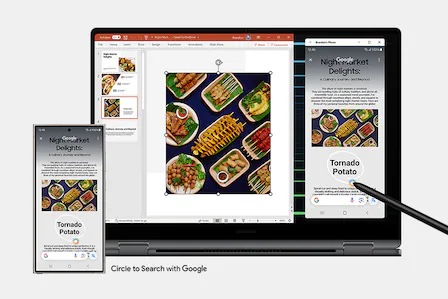
Galaxy connected experience
2-in-1 design. Flex to work, flip to create
Galaxy Book5 Pro 360 puts a spin on daily productivity with its 2-in-1 convertible design. Weighing in at 1.69kg with a sleek Grey finish, it's your versatile companion for hustles on the move.


Supercharged performance. Unlock your AI experience
Transform the way you work and create with AI-powered experiences on Galaxy Book5 Pro 360. The NPU capable of up to 47 TOPS combines with the blazing-fast Intel® Core™ Ultra processor Series 2 to deliver robust AI performance — a total game changer for your PC productivity.


*CPU and GPU specifications vary depending on country or region.**Screen image simulated for illustrative purposes.***Copilot+ PC experiences are coming. Requires free updates when available. Timing varies by device and region. See aka.ms/copilotpluspcs”****NPU performance vary by processor. Intel® Core™ Ultra 5 and Intel® Core™ Ultra 7 support 40 TOPS and 47 TOPS respectively.
Stay powered with all-day battery¹˜⁴
Get the power to keep going all day — with a long-lasting 76Wh (typical) battery for up to 25 hours of video runtime. Take a break as you top up your laptop with 35% charge in just about 30 minutes using a light and compact charger that even works with your other Samsung Galaxy devices.


Dynamic AMOLED 2X. Your creations displayed brilliantly
Bring your artistic vision to life on the breathtaking 16-inch display. Marvel at the crisp details in high resolution with bright and vivid colours, smooth scrolling and onscreen motion, and reduced blue light emission for eye comfort.


*Screen image simulated for illustrative purposes. **Screen size is measured diagonally as a full rectangle without accounting for the rounded corners. Actual viewable area is less due to the rounded corners.***Blue light emission is reduced compared with conventional LCD displays.
Anti-reflective cover glass. Dazzling views at any angle
Experience a clear view of your favorite content with less distractions thanks to Corning® Gorilla® Glass with DX. Corning’s glass technology decreases the amount of unwanted reflections and glare, helping onscreen visuals to remain crisp and legible from different angles and particularly in brightly lit environments.


Touchscreen with S Pen. Tap to get creative
Create works of art intuitively using your fingertips or the included S Pen on the touchscreen of Galaxy Book5 Pro 360. Write, draw and navigate with responsive multi-touch gestures and fine-tune details across your projects with the accurate S Pen.


*Screen image simulated for illustrative purposes. Actual UX/UI may vary.**Adobe product screenshots reprinted with permission from Adobe.
Big woofers. Deeper sound
More than 2x larger than before, the 38mm Big woofers on Galaxy Book5 Pro 360 amplify low frequency sounds to deliver deep, rich bass for an immersive soundscape. Surround yourself in your favorite beats and stay in the groove with the upgraded quad-speaker system.


*The quad-speaker system on Galaxy Book5 Pro 360 features two woofers (5W max each) and two tweeters (3.3W each).**Galaxy Book5 Pro 360 features 38mm big woofers compared to the 18mm woofers on Galaxy Book4 Pro 360.
Wi-Fi 7. Full speed ahead
Surf, stream and share content on the fly with the lightning-fast speed of Wi-Fi 7. Go from uploading creative works online to enjoying your favorite shows in an instant with ultra-low latency and better reliability.


*Wi-Fi 7 network availability may vary by OS version, country, market, network provider and user environment. Requires optimal connection and a Wi-Fi 7 router.
Precise touchpad. Plenty of ports
Navigate easily using the touchpad with adaptive palm rejection — control your taps with precision thanks to palm monitoring on the subdivided palm area, reducing the chance of accidental touches. Plus, connect what you need dongle-free with versatile built-in ports, including HDMI, USB-A, microSD slot and two Thunderbolt 4 ports for rapid data transfers.


Samsung Knox. Pro security. Anti worry
Safeguard your system with premium security from Samsung Knox. A dedicated security chip in the hardware is designed to shield your device in real time. Protected all around, your laptop's critical system data can stay safe from potential threats and breaches.


*Image simulated for illustrative purposes. Actual UX/UI may be different.
AI experiences are coming


*Copilot+ PC experiences are coming. Requires free updates when available. Timing varies by device and region. See aka.ms/copilotpluspcs”
Link your phone. Unleash Galaxy AI on PC
Connect your smartphone to your PC via Phone Link to access recently viewed webpages or launch up to 5 mobile apps right from your laptop. Use smart features like Circle to Search with Google, Note Assist and Chat Assist from your Galaxy smartphone and get an expanded view on the big screen of Galaxy Book5 Pro 360.


*Users must link their Samsung Galaxy device to their Windows PC through ‘Link to Windows’ on phone and the Microsoft Phone Link App on PC and follow the set-up prompts, including being signed into the same Microsoft account. **Link to Windows is preloaded on select Samsung Galaxy devices. PC (Microsoft Phone Link App) requires Windows 10 or above. Microsoft Phone Link recommends Samsung Galaxy device to be on the same Wi-Fi network as the PC. ***Some mobile apps may restrict content to be shared on other screens. Some related features and availability Galaxy AI features may vary by device.****Samsung account login may be required for certain Samsung AI features.*****Samsung does not make any promises, assurances or guarantees as to the accuracy, completeness or reliability of the output provided by AI features.******Images simulated for illustrative purposes. Sequences shortened. Actual UI may be different.*******Galaxy AI features provided by Samsung are free. Future releases may include features that are offered on a paid basis. Different terms may apply for AI features provided by third parties.
The connected power of Galaxy
Seamlessly pair and control Galaxy devices
Nearby devices lets you connect and operate your Galaxy devices in an instant. Open the menu on Galaxy Book5 Pro 360 to link devices with a simple drag-and-drop, then launch intuitive features such as Multi Control and Storage Share between your phone, PC and Tab all from one connectivity hub.


*To use the Nearby devices feature, phone, tablet, or PC must be signed into Samsung account, Wi-Fi and Bluetooth must be enabled, and the following conditions must be met.
- Galaxy phones and tablets: One UI 7 or higher
- Galaxy Books: The Nearby devices app needs to be installed from the Microsoft Store. Samsung Settings 6.0 or higher. Samsung Continuity Service 1.13 or higher
**Discoverable devices:
- Galaxy phones and tablets: One UI 7 or higher required for full functionality. If your phone or tablet has One UI 4.1.1 or higher and Continuity Service 1.2.27 or higher, only limited features are available.
- Galaxy Books: Samsung Settings 6.0 or higher. Samsung Continuity Service 1.13 or higher
- Samsung TVs (released in 2016 or later), Smart monitors, and projectors: Must be turned on and must have been connected to the phone/tablet at least once using Smart View or DeX.
- Galaxy Buds, Watches (Galaxy Watch4 and above), fitness bands, and Rings: Must be paired with the phone using Bluetooth. Galaxy Buds must be removed from the case or the case must be opened.
***Feature availability may vary by region and device model.
Storage Share. Explore files across devices
With Storage Share, enjoy the freedom of using the storage on your phone and PC as one. Browse photos and play videos stored on your phone, edit mobile content and import it in your projects directly on your PC — no file downloading required.


*Each device must be signed in to same Samsung account and must have both Wi-Fi and Bluetooth turned on. Requires updated Galaxy phones and tablets with One UI 7 or higher and kernal version 5.15 or higher and Galaxy Book2 or later(Intel) and Galaxy Book4 or later(Arm) and Samsung Smart TV models including U8000 and above released after 2025.
**Feature availability may vary by region and device model.


Use your phone as a connected camera
Upgrade your video calls from standard laptop webcam to stunning clarity using your Samsung Galaxy smartphone as a connected camera. Connect seamlessly to your Galaxy Book5 Pro 360, switch between front and rear cameras to find your angle, and enjoy a high-quality picture with enhanced effects in Galaxy camera.
*To use phone as a connected camera service, users must link their Samsung Galaxy device to their Windows PC through ‘Link to Windows’ on mobile devices and the Microsoft Phone Link App on PC and follow the set-up prompts, including being signed into the same Microsoft account. PC (Microsoft Phone Link App) requires Windows 11 22H2 or above, Support Camera effect with OneUI 6.0 or above. Microsoft Phone Link requires Samsung Galaxy device to be on the same Wi-Fi network as the PC. Some related features may vary by device. **Screen image simulated for illustrative purposes. Actual UX/UI may be different.***Galaxy S24 Ultra and Galaxy Book5 Pro 360 sold separately.

It's all under control with Multi Control
Manage your creative projects with flexibility across devices with Multi Control. Use your Galaxy Book5 Pro 360's keyboard with a mouse to navigate through content on your smartphone, Galaxy Tab, Samsung TVs or Smart monitors. Drag and drop or copy and paste text, images and files between devices to put your ideas together.
*Each device must be registered with a single Samsung Account and connected to the same Wi-Fi network.**Multi control requires updated Galaxy phones and tablets with One UI 5.1.1 or above and Galaxy Book series devices released in 2021 or later with Samsung Settings v1.5(Intel) or Samsung Settings v3.3(ARM) and 2024 TVs or 2024 Smart monitors.***Some functions(such as Copy & Paste or Drag & Drop) may not be available when using certain device models and apps.**** Feature availability may vary by region(e.g. not provided in People's Republic of China).*****Screen image simulated for illustrative purposes. Actual UX/UI may be different.******Galaxy S24 Ultra and Galaxy Book5 Pro 360 and the mouse sold separately.

Two screens are better than one
Get an instant dual-monitor experience with your Galaxy Book5 Pro 360 and Galaxy Tab side by side. Launch the Second Screen app from your laptop with just a click, then use Extension or Duplicate mode to rearrange your tablet's screen, or go vertical with Rotation mode.
*For a better experience, both devices must be signed in to the same Samsung account.**Available on selected Samsung Galaxy Tab models only, including Galaxy Tab S9, Tab S9+, Tab S9 Ultra, Tab S9 FE, Tab S9 FE+, Tab S8, Tab S8+, Tab S8 Ultra, Tab S7, Tab S7+, Tab S7 FE and Tab Active4 Pro with One UI 3.1 or later versions installed.***Available on Samsung Galaxy Book series devices with Windows 10 2004 OS or later version installed. Some additional functions are supported only on Samsung Galaxy Book series devices.****Some apps may not support this feature for content protection purposes.

Quick Share. File transfer at your fingertips
Share your inspiring concepts and finished masterworks to other Samsung Galaxy devices in a flash via Quick Share. If you need to send something more personal, the private sharing feature protects your sensitive data by encrypting it with blockchain technology.
*Available on devices with One UI 2.1 or above, with Android Q OS version or higher installed. Bluetooth Low Energy and Wi-Fi connection are both required for Quick Share. Supports Galaxy Books, including Qualcomm-based PCs released in 2020 and later, and Windows PCs with Intel Bluetooth/Wi-Fi from other manufacturers. (OS: Windows 10 2004 version or higher, Bluetooth driver: Intel 22.50.02 or higher, Wi-Fi driver: Intel 22.50.07 or higher). Number of devices Quick Share can share to at the same time may vary depending on the Wi-Fi chip hardware of the sharing device. Actual speed may vary depending on device, network condition and user environment. The transferable type, number, capacity and expiry date of files, as well as the number of simultaneous file shares in Private Share may be limited.Specifications
-
Windows 11 Home (Samsung recommends Windows 11 Pro for business)
-
CPU
Intel® Core™ Ultra 7 Processor 256V (P-core Up to 4.8 GHz 12 MB LLC Cache)
-
GPU
Intel® Arc™ 140V GPU (8GB)
-
GPU Type
Shared
-
NPU
Intel® AI Boost
-
Size (inch)
16.0"
-
Resolution
2880 x 1800 (WQXGA+)
-
Type
Dynamic AMOLED 2X, Anti-Reflective
-
Touch Screen
Yes
-
Pen Support
Yes
-
Memory Capacity
16 GB
-
Memory Type
LPDDR5X (On Package)
-
Storage Capacity
1 TB
-
Storage Type
NVMe SSD
-
Number of Storage Slots
1
-
Colour
Gray
-
Form Factor
Laptop
-
Speaker
Quad Speakers
-
Smart Amp
Yes
-
Sound Effect
Dolby Atmos®
-
Mic
Dual Array Digital Mic
-
Camera
2.0 MP
-
Wi-Fi
Wi-Fi 7, 802.11 be 2x2
-
Bluetooth Version
Bluetooth v5.4
-
HDMI
1 HDMI 2.1 (Supports 8K@60Hz, 5K@120Hz)
-
USB
2 Thunderbolt™ 4, 1 USB3.2
-
External Storage Support
MicroSD
-
Earjack
1 Headphone out/Mic-in Combo
-
Keyboard
Pro keyboard with Numeric key
-
Keyboard Backlit
Yes
-
Touchpad
Clickpad
-
PEN
S Pen
-
TPM
Yes
-
FingerPrint Reader
Yes
-
Battery Capacity (Wh, Typical)
76.1
-
AC Adapter
65W USB Type-C Adapter
-
USB PD Support
Yes
-
Power Required for Charging (Min / Max, W)
60 | 65
-
Dimension (WxDxH, mm)
355.4 x 252.2 x 12.8 mm (13.99" x 9.93" x 0.50")
-
Weight (kg)
1.69 kg (3.73 lbs)
-
Ambient Light Sensor, Accelerometer Sensor, Gyro Sensor
-
SmartThings Support
Yes
Reviews
Galaxy Book5 Pro 360 (16", Core Ultra 7, 16GB)
- The Samsung Galaxy Book5 Pro 360 laptop offers impressive performance, fast processing, and excellent battery life.
- The high-resolution AMOLED display, 360-degree hinge, and touchscreen functionality with S Pen support are key strengths.
- Some users have reported issues with the screen, including spontaneous cracking and poor palm rejection on the touchpad.
- A few reviewers found the sound quality lacking and the overall performance to be mediocre at times.
- Prospective buyers should carefully consider the product's features and potential drawbacks based on their specific needs.
Reviews with images & videos
Filters
Relevancy sort puts the best reviews at the top. We look at things like helpfulness votes, latest review, pictures and other traits that readers look for in their reviews.
Filters
24 Reviews
2026-06-25
Huddersfield UK
![[D] Alternative Text](https://photos-us.bazaarvoice.com/photo/2/cGhvdG86c2Ftc3VuZy1lbl9nYg/65cdc532-f1fc-5354-9dc8-cbae4ac72d9a)
![[D] Alternative Text](https://photos-us.bazaarvoice.com/photo/2/cGhvdG86c2Ftc3VuZy1lbl9nYg/6e49288e-bd51-5365-9b1d-900a4af9812c)
CX
We’re so sorry to read about your experience with your Galaxy Book5 Pro, especially with the cracked screen on the left corner after just a month and a half of use. We would recommend getting in touch with us directly, so we can look into this further and provide the support you need. You’ll find our contact details and operating hours via the link below: http://www.samsung.com/uk/support/contact/ We value your feedback, as it helps us improve our services for our valued customers, and we hope to resolve this for you as quickly as possible. ^HB at Samsung Support
2025-06-04
London, United Kingdom
![[D] Alternative Text](https://photos-us.bazaarvoice.com/photo/2/cGhvdG86c2Ftc3VuZy1lbl9nYg/b8e67ece-bd7c-5d07-a38b-0eaafec93407)
![[D] Alternative Text](https://photos-us.bazaarvoice.com/photo/2/cGhvdG86c2Ftc3VuZy1lbl9nYg/492ea778-3692-5828-a59f-bccf975d3cdc)
CX
It makes us proud and happy to see that you have given the Galaxy Book5 Pro 360 five full stars, Bhavin! This premium product brings your artistic vision to life on its breathtaking Dynamic AMOLED 2X touchscreen display, which will also impress you every moment with crisp details in high resolution, bright and vivid colours, and smooth scrolling. Keep enjoying! ^CL at Samsung Support
2025-09-04
Hull, East Yorkshire, England
![[D] Alternative Text](https://photos-us.bazaarvoice.com/photo/2/cGhvdG86c2Ftc3VuZy1lbl9nYg/1f7aed2e-43be-5892-9fac-263d86b8ab4b)
![[D] Alternative Text](https://photos-us.bazaarvoice.com/photo/2/cGhvdG86c2Ftc3VuZy1lbl9nYg/bc7cf9e9-a1f1-5d06-93ef-678e9ddd87d9)
CX
We’re thrilled to read your thoughts and feedback. Thanks for sharing with us and giving us top marks, John! ^EW at Samsung Support
2025-08-29
Pune, India
![[D] Alternative Text](https://photos-us.bazaarvoice.com/photo/2/cGhvdG86c2Ftc3VuZy1lbl9nYg/6768fcfc-038a-5f18-8f18-0a0bafe43d5a)
![[D] Alternative Text](https://photos-us.bazaarvoice.com/photo/2/cGhvdG86c2Ftc3VuZy1lbl9nYg/78ba3007-4f8a-574e-aa56-81df42cdff3d)
CX
We are disheartened to see your Galaxy Book5 Pro 360 has endured damage. Our products are built to last, and with the impressive 16.0" WQXGA+ AMOLED Anti-reflective display, you'll get the ultimate viewing experience! We know our engineers will determine the cause of the issue, and get this working to perfection again. You can get Samsung Care+ within 6 months of purchase to buy a policy, however, you won't be able to get this covered on it as you are yet to purchase the policy. We'd recommend contacting our Support Teams for further assistance regarding this. You can find their contact details and opening hours here: https://www.samsung.com/uk/support/contact/ ^LB at Samsung Support
2026-02-13
West Sussex, UK
![[D] Alternative Text](https://photos-us.bazaarvoice.com/photo/2/cGhvdG86c2Ftc3VuZy1lbl9nYg/5693860d-d869-5834-bdf7-f30b7639acbc)
![[D] Alternative Text](https://photos-us.bazaarvoice.com/photo/2/cGhvdG86c2Ftc3VuZy1lbl9nYg/06b80301-dbbd-512d-9bca-a41b7d8779b3)
CX
We are disheartened to see you are facing issues with your Galaxy Book5 Pro. This is not what we expect to happen, and we can assure you that all of our products are built to last, and the materials are of high standard! Our engineers will do a thorough check of your device and if they find the issue is due to physical damage that voids your warranty, then any repairs will be chargeable, and this is in line with the Terms and Conditions of your warranty agreement. Your loyalty to us means the world to us, and we can assure you that we'll continue to impress you for years to come, and we'd hate to see you part ways with us. Therefore, please reach out to our Support Teams who can look further into this for you. You can find their contact details and opening hours here: https://www.samsung.com/uk/support/contact/ ^LB at Samsung Support
2025-12-15
North east
![[D] Alternative Text](https://photos-us.bazaarvoice.com/photo/2/cGhvdG86c2Ftc3VuZy1lbl9nYg/84332451-2021-5c30-adbe-09ae7adc5699)
![[D] Alternative Text](https://photos-us.bazaarvoice.com/photo/2/cGhvdG86c2Ftc3VuZy1lbl9nYg/0505e1a3-1f27-584e-8e58-358d906d0098)
CX
We are sorry to see you are having issues with the display on your Book5 Pro, Bryn. We are not aware of any issues with the display on the Book5 Pro, and can guarantee that it is made with high standard materials, and the 16.0" WQXGA+ AMOLED display will wow you for years to come! If you have endured any physical damage, then this will void your warranty and any repairs will be chargeable. This is line with the Terms and Conditions of the warranty agreement. Our engineers will thoroughly investigate this, and will give you the outcome to get your laptop back working to perfection. We recommend reaching out to our Support Teams who will be on hand to help. You can find their contact details and opening hours here: https://www.samsung.com/uk/support/contact/ ^LB at Samsung Support
2026-04-15
South Wales
![[D] Alternative Text](https://photos-us.bazaarvoice.com/photo/2/cGhvdG86c2Ftc3VuZy1lbl9nYg/c6e2698b-856d-583f-90d6-6117c4ac39b3)
![[D] Alternative Text](https://photos-us.bazaarvoice.com/photo/2/cGhvdG86c2Ftc3VuZy1lbl9nYg/56a1199d-f53d-5309-b692-ead009c9295f)
Samsung
We appreciate you taking the time to explain your experience with the Galaxy Book5 Pro, and we understand how important it is to have a device you can rely on every day, Pa. We also acknowledge that you’ve already been in touch with our Support Teams, who identified signs of physical stress to the display. While this type of issue isn’t covered under the manufacturer’s warranty for repair, we would still recommend proceeding with having your product repaired by our trained engineers, who will restore your laptop to its original condition. If you’d like to proceed, our Samsung Support Teams will be happy to guide you through the next steps and discuss the available options. Our contact details and opening times can be found here: https://www.samsung.com/uk/support/contact/ You can also book a repair directly with one of our authorised service centres here: https://www.samsung.com/uk/support/repair/ We’d also like to reassure you that all Samsung IT products, including this model, undergo extensive quality testing for durability, reliability and performance before reaching our customers. Your feedback as a long‑standing Samsung customer has been shared accordingly. We hope to have the opportunity to support you further and to continue being part of your Samsung experience. ^CL at Samsung Support
2025-10-31
London
![[D] Alternative Text](https://photos-us.bazaarvoice.com/photo/2/cGhvdG86c2Ftc3VuZy1lbl9nYg/ba6a59cf-25e2-5399-8976-9eb0a7f7e3f9)
![[D] Alternative Text](https://photos-us.bazaarvoice.com/photo/2/cGhvdG86c2Ftc3VuZy1lbl9nYg/1bb688b9-75ea-51ef-a673-0714184d7248)
Samsung
We’re disheartened to hear that the Galaxy Book5 Pro didn’t meet your expectations in terms of design and durability. If you still need support, please don’t hesitate to get in touch. Our full contact details and opening times can be found here: https://www.samsung.com/uk/support/contact/ We’d also like to reassure you that all our laptops are quality checked to ensure they meet our high standards of quality and durability. ^CL at Samsung Support
2024-11-29
Berkshire
![[D] Alternative Text](https://photos-us.bazaarvoice.com/photo/2/cGhvdG86c2Ftc3VuZy1lbl9nYg/7905abf1-c0d7-581b-85b9-5c0897a33fcd)
![[D] Alternative Text](https://photos-us.bazaarvoice.com/photo/2/cGhvdG86c2Ftc3VuZy1lbl9nYg/2784c773-0ce1-5917-b335-828968dd49c6)
CX
Thank you for taking the time to review the Galaxy Book5 Pro 360. We take pride in creating products that match the expectations of our customers, and we regret to see this has not been the case for you on this occasion. Physical damage is not covered by warranty and any repair will be chargeable. We encourage you to liaise with our Customer Support. We have a whole host of different options to get in touch, you can see them all (as well as their associated operating hours) on our Contact Us page: https://spr.ly/6424tQiIe ^CH at Samsung Support
2025-04-10
Scotland
![[D] Alternative Text](https://video.api.bazaarvoice.com/f8c7609a-1ae7-4c19-8f14-8c207e449802/thumbnail/image-00001.png)
CX
We are disheartened to read that you are not happy with your Galaxy Book5 Pro 360 because you have been experiencing constant issues with the display, with the performance also not meeting your expectations overall. It is also our understanding that you have already contacted our Support Teams about this, although you didn't find the guidance provided very useful. We appreciate that this situation is not ideal, and please don't hesitate to reach out to our IT specialists, who will be ready to offer you further assistance with getting the best experience out of this smart and powerful laptop. You can contact them at 0333 000 0333, Mon-Fri | 8am to 8pm, Sat-Sun | 9am to 6pm or on Live Chat here: https://bit.ly/SamsungUK-Support ^CL at Samsung Support
2026-05-04
53 galingale view Newcastle-under-lyme, 53
![[D] Alternative Text](https://photos-us.bazaarvoice.com/photo/2/cGhvdG86c2Ftc3VuZy1lbl9nYg/b226ee29-f177-5b76-92a4-e32e2dc25a2d)
![[D] Alternative Text](https://photos-us.bazaarvoice.com/photo/2/cGhvdG86c2Ftc3VuZy1lbl9nYg/080bb9e6-4580-5a2f-ac50-ad178f84b926)
Samsung
We are delighted to see you are loving your spectacular Galaxy Book5 Pro! Thanks to the powerful Intel® Core™ Ultra processor, you'll get the best performance possible, and with the striking 16" Dynamic AMOLED 2X display, everything will come to life, and the lightweight design will enable you to take this around easier than ever before! ^LB at Samsung Support
2025-03-12
Bedford
![[D] Alternative Text](https://photos-us.bazaarvoice.com/photo/2/cGhvdG86c2Ftc3VuZy1lbl9nYg/ba4fa0ed-d2c0-5231-8eb3-a2be72212f03)
![[D] Alternative Text](https://photos-us.bazaarvoice.com/photo/2/cGhvdG86c2Ftc3VuZy1lbl9nYg/cc6b2197-4fb6-5e60-8b18-4fb43c3824ec)
CX
We regret seeing that you're not getting the performance levels that you were expecting from your Book5 Pro 360. We recommend speaking to our Customer Support team so that they can look into this with you, and go through all available solutions. You can find details for the different ways to contact them, plus their opening times, by following this link: https://bit.ly/HelpandContact ^DB at Samsung Support
2025-03-12
London
CX
Thank you for taking the time to share with us this in-depth review about your amazing Galaxy Book5 Pro 360. We are pleased to read that you find the battery of this laptop very usable, and that you are also impressed by its excellent connectivity, compact design and clear display, as well as its 2-in-1 feature. We also appreciate that you wished this laptop to support a SIM or eSIM, as well as for the performance and changing of screen orientation to be more reliable. Please don't hesitate to get in touch with our IT specialists, who will be more than happy to assist you with getting the best experience out of it. You can contact them at 0333 000 0333, Mon-Fri | 8am to 8pm Sat-Sun | 9am to 6pm or on Live Chat here: https://bit.ly/SamsungUKSupport ^CL at Samsung Support
2025-06-04
2025-03-12
Surrey
CX
We are over the moon to see you are loving your Galaxy Book5 Pro 360, Tony! With the joint powers of the Intel® Core™ Ultra 7 Processor and the impressive 76Wh battery, you will get hours of fun! Wi-Fi 7 will give you the ultimate connectivity. The insane 2-in-1 convertible design will give you more freedom to do those specific tasks and take your productivity to new heights! Not only this, with the S Pen your creativity will wow everyone you meet! ^LB at Samsung Support
2025-10-22
Samsung
We're thrilled to hear that you're enjoying your Galaxy Book5 Pro 360, Bruce. The premium design is so sleek and stylish. The performance is strong for all of your tasks and workloads, whilst the battery is one of the laptop's most impressive features, delivering excellent longevity. The display brings you vibrant and accurate colours, deep blacks, and a smooth refresh rate. Meanwhile, the 360-degree hinge allows the display to be folded completely back, transforming the laptop into a tablet! Many thanks for taking the time to write your five star review. Your feedback means the world to us!^EW at Samsung Support
2025-03-14
London
CX
Thank you for your feedback, Rahul, although we do regret seeing that you've not been getting everything that you were hoping for from the design of your Galaxy Book5 Pro 360. We're happy to take on board your feedback, so that we can keep on providing our customers with everything that they'd want. ^DB at Samsung Support
2025-03-27
Leyton, london
CX
It's fantastic to see that you're loving your Book5 Pro 360, and that you'd be happy to recommend it to others. It's slim enough so that you can carry it around wherever you need it, and the AI charged processor will keep everything running flawlessly. ^DB at Samsung Support
2025-11-09
CX
Thanks for taking the time to share your review, Ely! We're so pleased to hear that you're enjoying your Galaxy Book5 Pro 360 overall. The Galaxy Ecosystem enables connected experiences between Galaxy devices, and your laptop is compatible with this. You can find out more right here: https://www.samsung.com/uk/mobile/connected-experience/ The above link will help answer any questions you have regarding using the Ecosystem. We're super excited for you to try out the effortless connectivity modes! ^EW at Samsung Support
2024-10-07
CX
Thank you for taking the time to review the Galaxy Book5 Pro 360. We strive to make devices that meet the demands of our customers and improve upon past iterations, we regret to see this has not been the case on this occasion for you. The Galaxy Book5 Pro 360 comes equipped with an Intel Core Ultra 7 processor and Intel Arc GPU over the previous models Snapdragon X Elite processor and Qualcomm Adreno GPU. More than 2x larger than before, the 38mm Big woofers on Galaxy Book5 Pro 360 amplify low frequency sounds to deliver deep, rich bass for an immersive soundscape. With regards to your Galaxy Buds auto switching, we'd love to get to the bottom of this for you. Contact details and opening times for technical support can be found through the following link: https://spr.ly/6421qMxh1 ^CH at Samsung Support
2026-03-09
Harborne
CX
While it's great to see that you are thoroughly enjoying the Galaxy Book5 Pro 360, Eric, it's a shame that you have faced issues with support. The manual for every device can be found on the product page on our website, in the 'Support' section, directly underneath the 'Reviews' section. Here's a handy link, should you need it: https://downloadcenter.samsung.com/content/UM/202603/20260303103725592/96xQHA_Win11_UG_ENG_Rev.3.0_260223.pdf If you require the full model number and are having difficulty reading the sticker on the device, we would recommend checking your receipt, as it will be listed there. Great idea to copy this and the serial number into an email for yourself, should you need it later. We're sorry to see that you had trouble getting through to our Support Teams. As we have just released a new range of devices, we are experiencing high levels of contact, which is causing longer queue times. We apologise for any inconvenience this causes, and can assure you that we are still here to help, it just may take longer than expected to speak with us. Registering your product is done with your Samsung Account, so it is tied to you. Our standard warranty doesn't need to be registered for, as it is applied automatically, so please rest assured that this will not impact the support you receive. Thank you for sharing your feedback with us, we will use it to inform the continuous improvement of our services. With further usage, we're sure that your wonderful new Galaxy Book will earn five full stars. ^SK at Samsung Support
2025-10-08
Stockton-on-Tees
CX
We’re thrilled to read your thoughts and feedback. Thanks for sharing with us and giving us top marks! ^LB at Samsung Support
2025-10-10
Bristol
CX
We love reading that we’ve given you that five-star feeling. Keep enjoying! ^KF at Samsung Support
2025-08-11
Liverpool
Samsung
Thank you for the positive feedback! ^CL at Samsung Support
These reviews are managed by Bazaarvoice and comply with the Bazaarvoice Authenticity Policy, which is supported by anti-fraud technology and human analysis. Details at
https://www.bazaarvoice.com/uk/trustmark/